Brother P-touch PTD210 Review: The Classroom Label Maker?
Supply bins, book baskets, cubbies and drawers, all labeled in clean print. The home label maker Brother has sold for years, and why teachers keep wanting one.
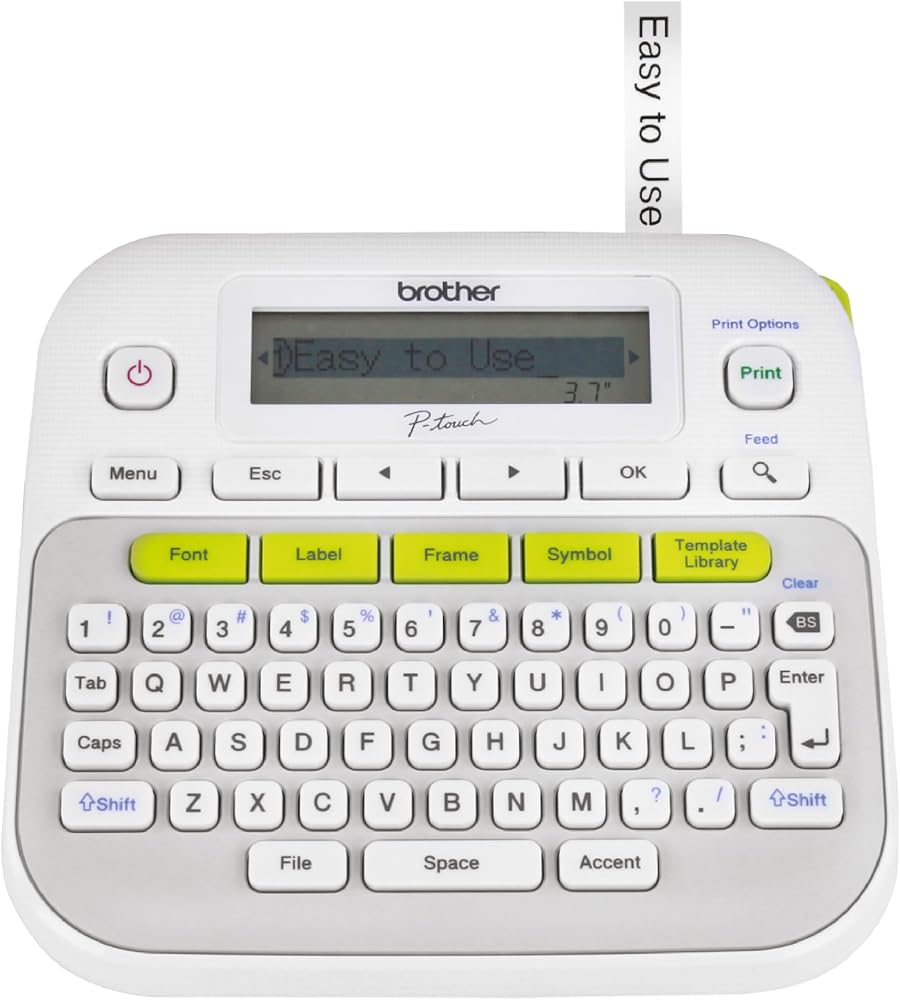
Yes, for the teacher who labels every bin in the room. Printed tape outlasts marker on masking tape by years and looks neat from across the room [1]. If they already own one, give extra tape instead.
 By Andrew Pataleta, GiftX founder · Updated October 29, 2026 · Sources
Specs at a glance
| Model | PTD210 [1] |
| Labels | Up to two lines, tapes up to 12 mm wide [1] |
| Fonts | 14 fonts and 10 styles [1] |
| Frames and symbols | 97 frames, 600+ symbols [1] |
| Templates | 27 built-in templates [1] |
| Thermal, monochrome [1] | |
| Weight | About 16 ounces [1] |
Pros and cons
- Tape refills add up for a big project
- No backlit screen
- Monochrome only
A room of labeled bins
A classroom runs on bins: glue sticks, scissors, leveled books, finished work. Handwritten labels on masking tape peel and smudge by winter, and kids stop putting things back.
A label maker makes the room readable for a six year old and for a substitute teacher on a sick day.
Labels also teach routines. When every bin has a word and a picture, kids can clean up on their own, and the teacher spends less of the last ten minutes of the day sorting scissors from glue sticks.
Fonts, frames and two lines
Brother lists 14 fonts, 10 styles, 97 frames and more than 600 symbols, with one touch keys to reach them [1]. It prints up to two lines on tapes up to 12 mm wide, and the screen previews each label before it prints [1].
There are 27 templates for quick labels, and it weighs about 16 ounces [1]. The screen is not backlit, which is fine in a lit classroom [1].
The keyboard is a full QWERTY layout rather than a phone style keypad, so typing a list of twenty student names for cubbies goes quickly. Labels come out ready to peel and stick on plastic, wood or cardboard.
Tape is the real cost
The machine is a one time buy. The tape is not, and a teacher labeling a whole library can empty a cassette in an afternoon.
It also prints in one color. For bright, colorful labels, teachers still reach for printed card stock and the laminator.
None of this is a reason to skip it. It just means the best version of the gift includes a little extra tape, so the teacher is not rationing labels by February.
Gift it with spare cassettes
Add one or two extra tape cassettes in the same width so the teacher can finish a project without a store run.
From this guide, the Scotch Thermal Laminator makes a strong pair for a class gift, and the Post-it Super Sticky Notes are a cheap add-on for the same organized teacher.
If you are not sure the teacher wants one, ask your child whether the bins in the room have handwritten labels. If they do, this is a safe bet.

FAQ
What labels does the Brother PTD210 use?
It prints on Brother TZe label tapes up to 12 mm wide, with up to two lines of text [1]. TZe tapes come in many colors and in laminated versions that resist water and wear, which suits bins that kids handle every day [1]
Can the Brother P-touch PTD210 print symbols?
Yes. The listing lists more than 600 symbols, 97 frames, 14 fonts and 10 styles, all reached with one touch keys [1]. Teachers use symbols for picture labels in early grades, where a pencil icon helps kids who cannot read yet. Frames make labels for a classroom library stand out on a shelf [1]
Featured in these guides
All product reviews · All gift guides
Sources and how we checked
- Amazon.com listing for the Brother P-touch PTD210 Label Maker
Source check: Amazon prices and contents above were checked on October 29, 2026. We did not test these products hands-on. Picks are based on manufacturer specs, Amazon listings and the reasons people actually give these gifts.
As an Amazon Associate, GiftX earns from qualifying purchases. Prices and availability change, so check Amazon for the current price.