SOLAKAKA SM600 Review 2027: A Gaming Mouse Worth Gifting?
A green honeycomb mouse that connects three ways: a USB dongle, Bluetooth or a USB-C cable. It looks like a gamer's mouse and works on a work laptop too.
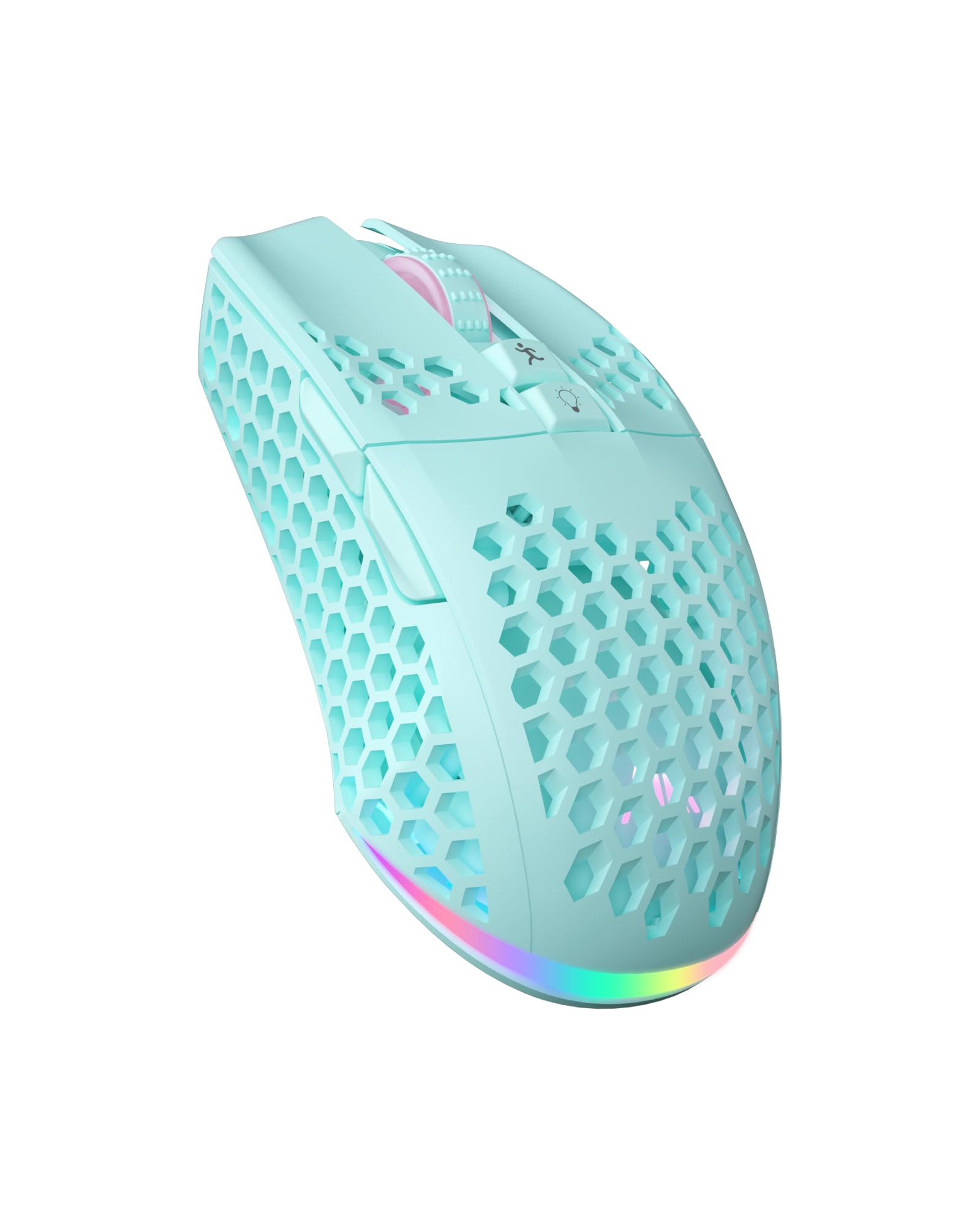
Mostly yes, for a casual gamer or a heavy computer user who likes a light mouse. It switches between up to four devices and charges by USB-C [1]. Skip it for a serious competitive gamer who already owns a premium brand.
By Andrew Pataleta, GiftX founder · Updated November 17, 2026 · Sources
Specs at a glance
| Connection | 2.4G wireless, Bluetooth, USB-C wired [1] |
| Saved devices | Up to 4 [1] |
| Buttons | 7 programmable [1] |
| DPI | 6 adjustable levels [1] |
| Polling rate | Up to 1000Hz [1] |
| Battery | 600 mA, USB-C charging [1] |
| Lighting | RGB rainbow, single color or off [1] |
| Shell | Hollow honeycomb ABS [1] |
Pros and cons
- Honeycomb holes collect dust and crumbs
- Software is needed for macros and button changes [1]
- Not a premium brand for serious esports players
One mouse for the PC, the laptop and the tablet
Most budget gaming mice are wired only. The SM600 connects three ways: a 2.4G wireless receiver, Bluetooth, or a USB-C cable [1].
It remembers up to four devices, and it works with a PC, a laptop, a tablet or a phone [1]. One mouse can move from the gaming desk to the work laptop with a button press.
Buttons, DPI and the honeycomb shell
There are seven programmable buttons, set through software along with DPI, mode and lighting [1]. Sensitivity steps through six DPI levels, and the polling rate goes up to 1000Hz [1].
The hollow honeycomb shell is made of ABS. It cuts weight for long sessions and helps heat escape from the palm [1].
A 600 mA battery charges by USB-C, a flashing red light warns when it runs low, and the mouse keeps working while it charges [1].
What the honeycomb costs you
The holes that make it light also let in dust and crumbs. A desk eater will need to blow it out now and then.
Macros and button remapping need the SOLAKAKA software [1]. For plug and play use that does not matter, but tinkerers should know it. And for a competitive player with strong brand loyalty, this is a fun spare, not a main mouse.
A gamer gift that fits the budget
In a Secret Santa draw this is the pick for the coworker with a gaming setup at home. The green shell and RGB light look like more than the price, and it is useful on a plain office desk too.
From our Secret Santa guide, pair it with the ErgoFoam under desk foot rest for long sessions, or with the PILPOC theFube fidget cube for loading screens.
Answer five quick questions about the person and GiftX picks gifts for your budget.
New gift ideas every week, a 60 second gift quiz and wish lists your friends can reserve from. Free on iPhone and Android.
FAQ
Does the SOLAKAKA SM600 work with a Mac or a tablet?
The listing says it supports a PC, a laptop, a tablet and a mobile phone, and it connects by a 2.4G receiver, Bluetooth or a USB-C cable [1]. With Bluetooth it pairs without the dongle, useful on a tablet with no USB port. Button customization runs through software, which may be limited outside a PC [1]
How do you charge the SM600?
It has a built-in 600 mA lithium battery that charges with the included USB-C cable [1]. A flashing red light warns when the battery is low, and the mouse keeps working while it charges on the cable, so a dead battery never ends a game [1]. Turning the RGB light off helps the charge last longer [1]
Is a honeycomb mouse good for everyday work?
Yes, the shape is ergonomic and the hollow shell keeps it light for long use [1]. The RGB lighting can be switched off for a plain office look with the top button [1]. The only real downside is that the holes collect dust, so it needs an occasional clean with compressed air or a soft brush [1]
Sources and how we checked
- Amazon.com listing for SOLAKAKA SM600 Wireless Gaming Mouse with Honeycomb Shell, Green, checked November 17, 2026
We did not test this product hands-on. Facts come from the Amazon listing and the maker.
GiftX earns a commission from qualifying purchases through these links, at no extra cost to you.