How to Share a Christmas List With Family Without Duplicate Gifts
How to share a Christmas wishlist with family so nobody buys the same gift twice: one link, reserving, messages for older relatives and lists for kids.
Short answer: share your Christmas wishlist as one link that stays up to date, not as screenshots, and use a list where relatives can mark the gift they are buying so everyone else sees it is taken. Send the link once in a short, friendly message, then remind people closer to the holidays. That alone stops most duplicate gifts.
Duplicates rarely happen because family is careless. They happen because the list lives in five places: a photo in the cousins' chat, a text to Grandma, an email to an aunt who never checks email. Each person sees a different version, nobody knows what others bought, and two identical sweaters show up on Christmas morning. The steps below fix the system, not the people.
Why shared lists still end up with duplicates
Most families already share lists. They still get doubles, for a few predictable reasons:
- Screenshots go stale. The moment someone buys an item, every screenshot is out of date.
- Nobody says what they bought. Relatives do not want to spoil the surprise, so they stay quiet.
- Two lists exist. The list sent in November and the updated one sent in December both float around.
- Side conversations. Grandma tells Mom she is buying the bike, and Dad never hears about it.
- Vague items. "Lego" on a list means three different relatives buy three different sets, or the same one.
The one-link method, step by step
This takes about twenty minutes to set up and saves a lot of awkward returns in January.
- Put every item in one online wish list, with a link, a price and a photo.
- Add sizes, colors and versions directly on the item, not in a separate message.
- Copy the share link for that list.
- Send it to family once, in one message, ideally the last week of November.
- Ask everyone to mark an item as taken when they decide to buy it.
- Edit the list itself when something changes, so the link always shows the latest version.
- Send a short reminder with the same link around the second week of December.
The key is step five. A list only prevents duplicates if buyers can see what others already chose.
How reserving works, and why the owner should not see it
In a GiftX wish list, relatives open your link and tap Reserve on the item they plan to buy. Everyone else who opens the link sees it marked as reserved, so they pick something else. The list owner does not see who reserved what, which keeps the surprise intact even though you made the list yourself.
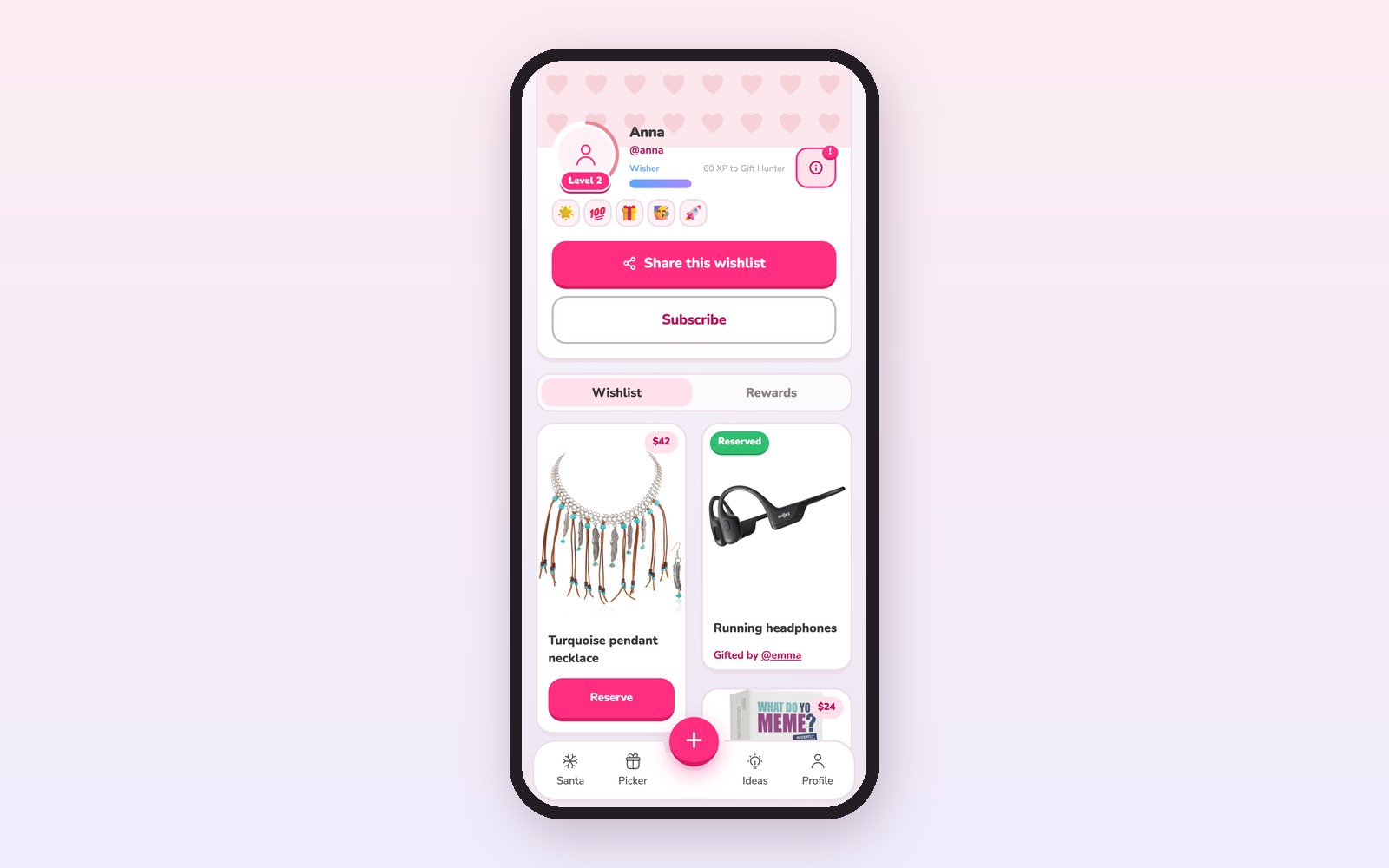
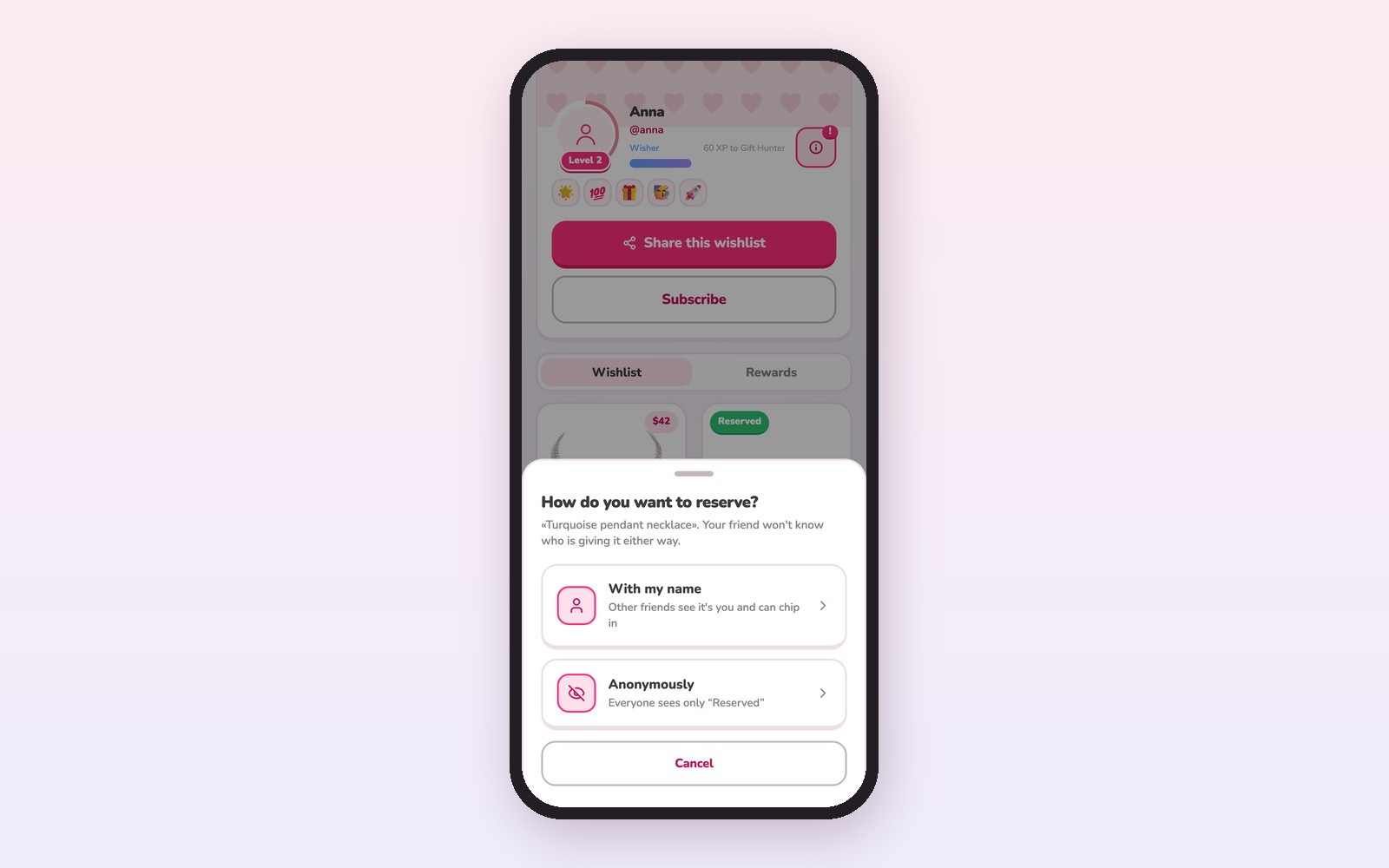
When someone taps Reserve, GiftX asks whether to reserve with their name or anonymously. Either way, the item is off the table for everyone else, and nobody has to post "I've got the board game" in the family chat.
Messages that get older relatives to open the link
Grandparents and great-aunts are often the most generous buyers and the least likely to tap an unfamiliar link. How you send it matters.
- Make it personal. "Grandma, here is Ella's Christmas list. Tap the link to see pictures of everything."
- Explain the button once. "If you decide to buy something, tap Reserve so nobody else gets the same thing."
- Use the channel they use. A text works for most. For some, a phone call walking them through it is worth ten minutes.
- Offer to help. "If you'd rather, just tell me what you want to get and I'll mark it for you."
That last option is useful for relatives who will never open an app. Another family member opens the link and reserves the item for them, so the list stays accurate.
Lists for several kids in one family
Parents with two or three kids should keep one list per child, managed by the parent. One combined list confuses buyers and makes it hard to see if each child is getting a fair share.
| Situation | What to do |
|---|---|
| Two or more kids | One list per child, all links in one message |
| Kids in two households | Share each child's list with both sides of the family |
| A gift for the whole family | Put it on one parent's list with a note |
| Teens who want their own list | Let them manage it, check sizes before you share |
| Grandparents buying for every grandchild | Send all the grandkids' links together, labeled by name |
Collecting Christmas wishlist ideas from the whole family
Sharing goes both ways. If you are the person who organizes the family's Christmas, ask everyone to send their own list link back by a set date. A short message works:
"Hi all, could everyone send me their Christmas list link by the first of December? I'll put them all in one message so we can shop without doubling up."
Then forward the full set in one message, with each person's name and link. For extended families, pin it to the top of the family chat. If your family does a name draw instead of buying for everyone, read our guide to running a family Secret Santa across ages and households.
Small rules that keep things fair
A few family agreements make sharing smoother:
- Reserve only what you will buy. If plans change, tell the family so someone else can pick that gift up.
- Buy off-list freely, but say so. If you buy something not on the list, tell the parent so they can remove anything too similar.
- Do not delete bought items. If the list owner removes an item someone already reserved, the buyer gets confused. Leave it in place.
- Freeze the list mid-December. After that, new wishes go on a birthday list.
- No pressure on price. A mix of prices on the list lets everyone give within their budget.
Frequently asked questions
What is the best way to share a Christmas list with family?
Use one online wish list and send its link, not screenshots. Each item should have a link, a price and a photo. Choose a list where relatives can reserve gifts, so everyone sees what is taken. Send the link once in late November and a reminder in mid-December. Keep editing the same list instead of sending new versions.
How do I stop family from buying the same gift?
Let buyers mark items as taken. In a GiftX wish list, relatives tap Reserve, and everyone else sees the item is no longer available. The list owner does not see who reserved what, so the gift stays a surprise. For relatives who will not use a link, ask them what they are buying and have another family member reserve it for them.
Can I see who bought what from my wish list?
On a GiftX wish list, no: the owner does not see who reserved which gift, and that is on purpose. It keeps Christmas morning a surprise. Relatives can still see that an item is taken, which is what prevents duplicates. If you need to know, for example for thank you notes, ask after the holidays.
What if someone buys a gift that is not on the list?
That is fine and often lovely. Ask them to mention it to the parent or list owner, who can remove anything too similar from the list before someone else buys it. Off-list gifts become a problem only when they duplicate a list item, which is why a quick note helps.
Related guides
Need to build the list first? Start with our Christmas list template or how to make a Christmas wish list. Running a gift swap instead? See all our gift exchange guides.